
Chapter 6: Camera Settings, White Balance
Digital cameras require a certain amount of calibration to capture color information (RGB) properly. This calibration is called white balance, because the camera is being given the information it needs to identify white areas of the image and reproduce them correctly.
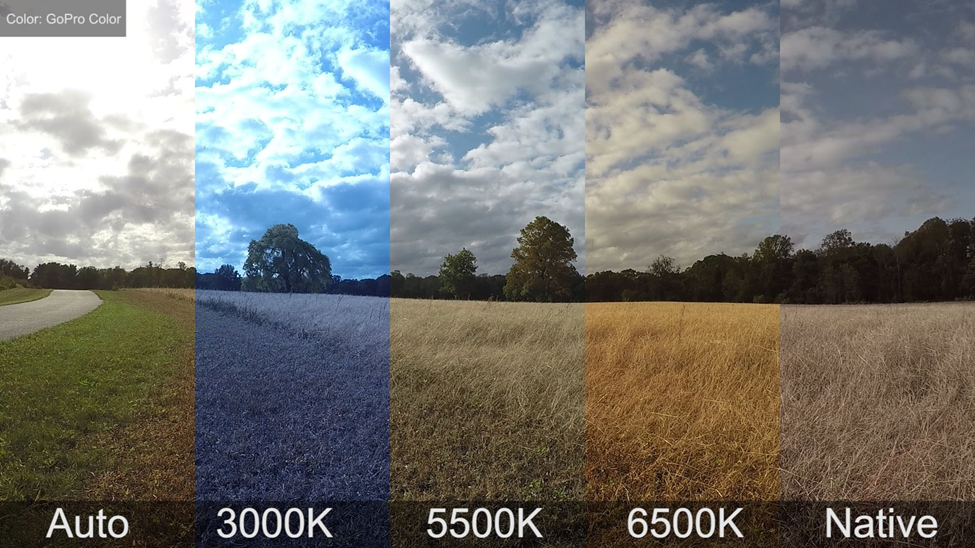
The image below shows the same scene white balanced to different color temperatures:
You can (and should) confirm or set the white balance on the Canon EOS 5D MkIV camera before capturing images or video. You can do this by pressing the WB button on the top right of the camera chassis. A menu will appear (it looks slightly different depending on whether you are shooting in image or video mode), and you can use the large dial on the right side of the camera chassis to select the white balance mode. The available white balance options are:
Which setting should you use? It will depend on what you are trying to accomplish, but the most usual settings would be:
You should check and confirm your white balance setting before you begin a photo or video shoot. Typically, you will want to leave the white balance setting alone once you set it to your preferred selection.
In video mode, the display screen on the camera will show you a preview of the color result from different white balance settings. In still image mode, you can take a test picture to see the effects of your white balance setting (the test picture will briefly appear on the display screen after you take the picture).
What is determined by white light from the camera, what is measured as white. Higher temperatures are cooler (blue tint), lower temperatures are warmer (orange tint). Baseline is whatever you set it to, everything below the baseline is orange or warmer, everything above the baseline is bluer or cooler.
Measured in Kelvin (temperature)
For a more in depth explanation, visit