
Packaging for Standalone
Setup
Meta Plugin
The Meta plugin for Unreal helps configure the project quickly and easily and can be disabled after applying settings if you don't need it. The plugin should be available if you are using one of the SCiL workstations, but if you are building elsewhere, you can find the instructions here: MetaXR Plugin
Additionally, the following may be helpful:
- Project Settings | Platforms | Android | APK Packaging | Package game data inside .apk?: True (useful for testing)
Manual Settings
Visit here for manual settings.
Config
Under Project Settings -> Android SDK -> SDKConfig set the following (use the 3 dots to choose the correct paths):
- Location of Android SDK: C:/Android/SDK
-
UE 5.6-5.7 - Location of Android NDK: C:/Android/SDK/ndk/27.xxx
- Location of JAVA: C:/Program Files/Android/Android Studio/jbr
Do not copy and paste above, set the actual folders using the ***... icon
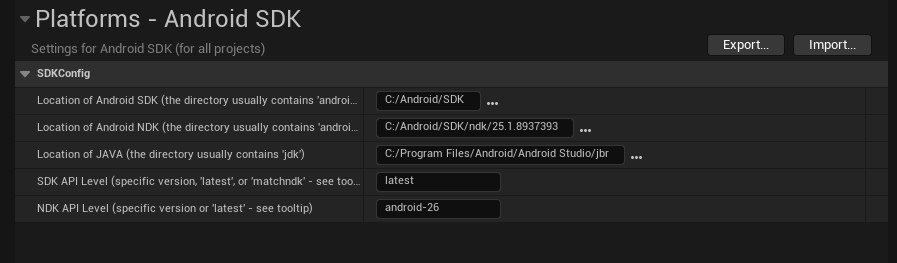
This screenshot is just a sample. The final folder name for each setting may be slightly different than what you see above, based on different versions or releases. Again, setuse the ... icon to the right of each setting to choose the actual folders listed above.folders.
Building (in the SCiL lab)
DO NOT run Install Sdk per the Unreal documentation on the SCiL workstations. They are configured differently.
Typically, Unreal would be configured according to the documentation if you are building at home. But for the SCiL lab, Android SDKs have been configured for all users of the workstation.
Go to Platforms -> Android -> Package Project
You will get a warning popup about SDK Not Setup. Click Continue.
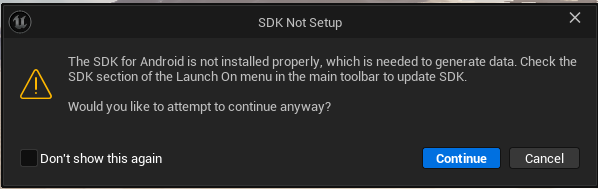
Select a folder (it is recommended to use a folder called Builds that is in the root of the project). This location will save for the next time you build too. You can then load your APK and OOB files to a headset via Meta Quest Developer Hub.
Common things to check if the project did not build:
- Ensure the SDK locations listed above are properly placed.
- Sometimes Gradle (the building tool) will fail because an instance is already running. Try the build again. If it persists, restart the computer (this removes the processes that may be running, especially if other users are using the machine and have logged out).
Building (not in lab)
For the individuals who wish to build at home, ensure Android SDK for Unreal is setup according to this documentation:
Additional Configurations
Additional settings may be required depending on the standalone/deployment platform (such as AppLab or Oculus store)